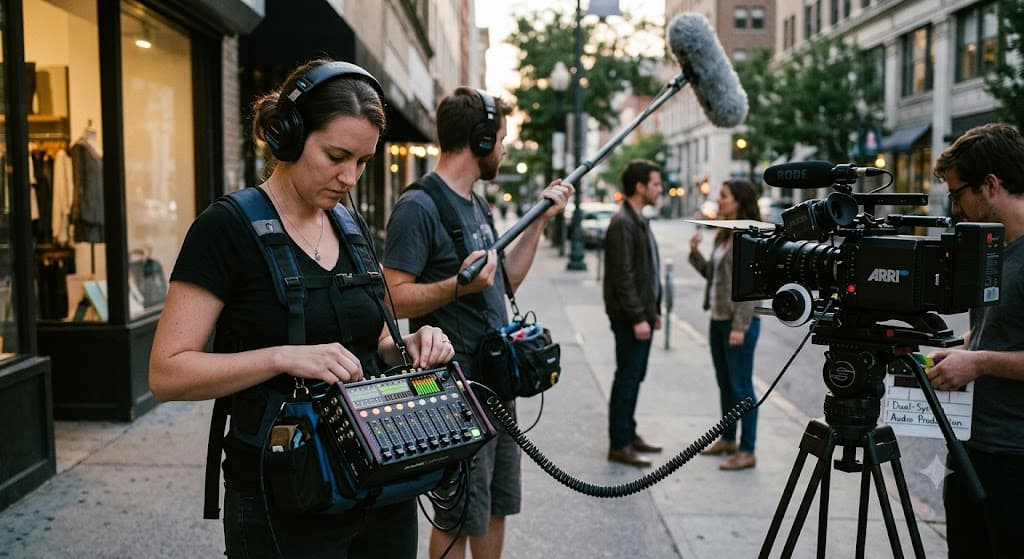
How Can Dual-System Audio Improve Professional Video Production?

Meta Minds
Lead AI Researcher
You can have a beautiful camera shot, great lighting, and a speaker who absolutely nails every line... and then you play the footage back and hear a buzzing sound. Ouch. This is where local video production companies often take a different approach by separating the camera from the main audio recording. It may sound like extra work, but dual-system audio can make a huge difference when clean, natural sound really matters.
What Is Dual-System Audio?
The idea is pretty simple.
Instead of recording the main sound directly into the camera, we use a separate audio recorder. The camera still captures the picture, while microphones feed sound into another device.
So, you have two systems working at the same time:
One for video
One for high-quality audio
Later, the editor brings them together.
At first, this might seem like one more thing to worry about during a shoot. And yes, there are a few extra steps. But once the workflow is set up properly, it becomes much easier to control the sound.
Why Does Separate Audio Matter?
Think about a business interview.
The person is speaking clearly, but there is an air conditioner humming in the background. Maybe a truck passes outside. Perhaps the microphone connected to the camera picks up too much room noise.
Not ideal.
With a separate recorder and a properly placed microphone, the audio team has more control over what gets captured. The voice can sound fuller, cleaner, and more natural.
That matters because viewers may forgive a slightly imperfect image. Bad sound? That can make people stop watching pretty quickly.
Better Control During Interviews
Interviews are a big part of corporate and business videos. When someone is explaining a service, sharing a company story, or talking about a product, their voice carries the message.
Dual-system audio gives the production team more freedom to use professional microphones that are positioned for the speaker rather than simply relying on the camera microphone.
We can place a lavalier microphone on the speaker, use a boom microphone when appropriate, or even record more than one source.
That extra flexibility can save a shoot when something unexpected happens.
It Gives Editors More Options
Here is another useful part... the editor gets more control.
Separate audio tracks can be cleaned, balanced, and adjusted without changing the video itself. If one microphone has a small problem, another recorded track may provide a backup.
There is also more freedom when cutting between shots. The editor can keep the speaker's voice flowing naturally even when the picture changes.
This is especially helpful when a video includes interviews, demonstrations, office scenes, or several people speaking.
What About Syncing the Audio?
This is probably the first concern many people have.
How do we match the separate sound with the camera footage?
Usually, the production team records a sync reference on the camera and a matching recording on the audio device. A slate or simple sync point can also help. Modern editing software can make the process much easier.
The key is preparation. Good crews label recordings, monitor sound during filming, and keep track of what belongs to each shot.
A little organization on set can prevent a giant headache later.
When Is Dual-System Audio Most Useful?
It can be especially helpful for:
Corporate interviews
Training videos
Customer testimonials
Commercials
Documentary-style projects
Product demonstrations
Events and presentations
Videos with multiple speakers
It is not always necessary for every little clip. Sometimes direct camera audio is perfectly fine. The choice depends on the location, project, people involved, and the final purpose of the video.
The Small Extra Effort Is Worth It
Good video is not only about what people see. It is also about what they hear.
When viewers can clearly understand a speaker without fighting through background noise, the whole production feels more comfortable and professional. There is no distraction pulling attention away from the message.
That is one reason many teams include separate audio recording as part of their professional video services when a project calls for stronger sound control.
Final Thoughts
Dual-system audio might not be the flashiest part of video production. Nobody usually talks about the audio recorder after watching a great company video.
And honestly, that is a good thing.
When the sound is clean, natural, and easy to listen to, it simply feels right. Behind the scenes, careful microphone placement, separate recording, monitoring, and syncing are doing the heavy lifting.
For productions where clear communication matters, taking audio seriously can turn an ordinary video into one that people actually enjoy watching.
Frequently Asked Questions
1. What does dual-system audio mean in video production?
Dual-system audio means recording sound separately from the camera. The camera captures the video while a dedicated recorder captures the main audio.
2. Is dual-system audio better than recording sound into the camera?
For many professional projects, yes. Separate recording can provide better microphone placement, more control, and cleaner sound. But the right setup depends on the project.
3. Is separate audio difficult to sync with video?
It can require an extra step, but a well-organized production team can make syncing quite straightforward using reference audio, timecode, or other sync methods.
4. Which videos benefit most from dual-system audio?
Interviews, corporate videos, testimonials, training content, documentaries, product demonstrations, and other projects where clear speech is important can benefit greatly.
5. Does dual-system audio make video production more expensive?
It can add some equipment and production time, but the improved sound quality and added recording options can be well worth the extra effort for professional projects.